To better optimize your website, Google Keyword Planner offers a variety of keyword suggestions, complete with search volume and competition data. Try this free, easy-to-use tool to gain an edge over your competitors.
The right keywords for your business are an opportunity to appear on the search engine results page. With plenty of SEO tools available, startups and small businesses often find it a bit challenging to determine which is the best tool. Most of the time, they end up using paid and expensive tools. The reason? They are unaware of their requirements. If you are one of those who want a free tool that delivers results, Google Keyword Planner is your solution.
Google is the most widely used search engine globally. With billions of searches every day, it collects valuable user data and delivers accurate keyword insights that help shape powerful SEO strategies. If you’ve been curious about how to use Google Keyword Planner for SEO, this guide is for you. This blog simplifies the process and shows you how to turn keyword data into business growth.
Key Takeaways
- What is Google Keyword Planner?
- How can you use Google Keyword Planner for SEO?
- The Hidden Secrets of Google Keyword Planner You Can’t Miss
- Practical Ways to Apply Keywords to Boost Your Business
- Pro Tip: Reading Beyond the Numbers
- Ready to Rank Your Business? Partner With Our SEO Services Consultants
What is Google Keyword Planner?
Google Keyword Planner is a keyword-finding tool powered by the Google Ads platform. It is a free alternative that helps many digital marketers looking for a reliable solution. Commonly, it works best for both paid and organic campaigns.
With this Google Planner tool, you can research relevant keywords while viewing metrics such as search volume, competitiveness, and cost per click. This helps you select the right keywords that can easily rank in search engines. Moreover, you can download the data in one go. The Keyword Planner tool highlights various types of “keywords” or “search phrases and terms” related to your business.
This tool is specially designed for PPC, where you can find the right keywords for your campaigns and bid on them.
How can you use Google Keyword Planner for SEO?
It’s an easy-to-use tool. To access Google Keyword Planner, you need a Google account. In any case, if you don’t have one, it’s mandatory to create it first. Follow these simple steps:
Go to the My Account sign-in page and begin creating your account.
Choose the type of account you want to set up, such as “For my personal use.”
Enter your personal details – first and last name, date of birth, and gender.
Pick a Gmail username, create a strong password, and confirm it.
Click Next to continue.
Add and verify your phone number. You’ll receive a verification code shortly. Enter it when prompted.
Optionally, add a recovery email address to help you regain access if you forget your password.
Review your information and agree to the Terms of Service and Privacy Policy. Your Gmail account is now ready.
Let’s move on to the next steps for using Google Keyword Planner effectively.
Upgrade Your Keyword Strategy with Our SEO Agency
As an experienced SEO agency, we know how to uncover and use the right keywords to create ranking opportunities that convert.
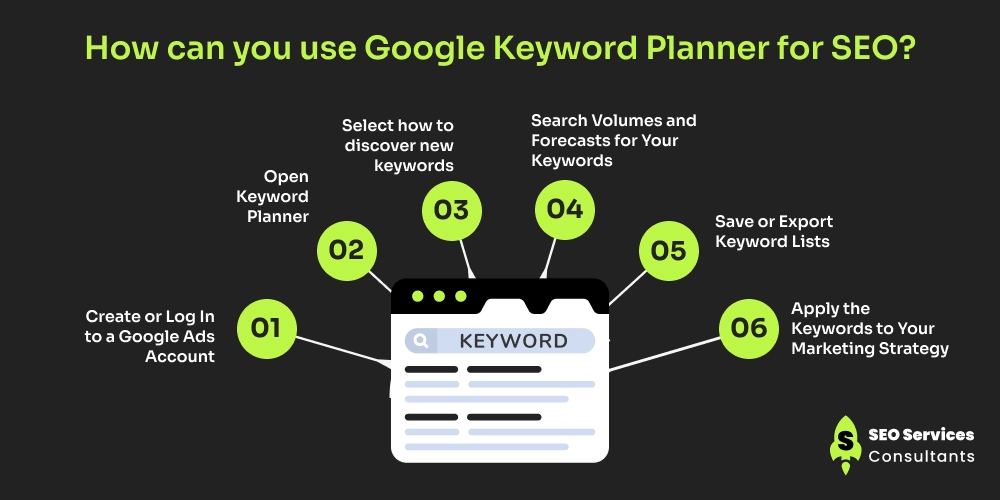
Step 1. Create or Log In to a Google Ads Account
To take advantage of Google’s free Keyword Planner tool for SEO, the first step is to sign in to the Google Ads website. If you already have a Google account, simply log in. Otherwise, click “Start now” to create one.
Next, switch your account to Expert Mode to unlock advanced features that aren’t available in Smart Mode. Now the question is how you will know that you are in expert mode? If the “Settings” icon appears in the top navigation menu, you’re already in Expert Mode.
For deeper keyword insights, you can also link your Google Search Console and Google Ads accounts. This connection provides additional keyword performance data and enhances your SEO analysis.
Once your account is ready, you can start exploring the Keyword Planner tool.
2. Open Keyword Planner
Inside Google Keyword Planner for SEO, you’ll find two main options:
Discover new keywords: Ideal for finding fresh keyword ideas that your audience is actively searching for.
Get search volume and forecasts: Displays the search volume for specific keywords and predicts their potential performance.
Let’s break down each option for a clearer understanding.
3. Select how to discover new keywords
When you select “Discover new keywords,” two options will appear on your screen.
Start with Keywords
Use this option when you already have an idea of what your audience might be searching for. Simply enter words or phrases that describe your business, products, or services.
For example, if you run a weight loss coaching service, you might start with terms like “lose belly fat,” “weight loss programs,” or “healthy diet plans.”
The Google Keyword research tool will then show related keyword ideas. Alongside, you can check the search volumes, competition levels, and average cost-per-click. This helps you identify which terms attract the most relevant audience.
After getting the relevant keywords, this method is ideal for refining your SEO strategy and discovering new, high-performing keywords you may not have considered.
Start with a Website
This feature lets Google analyze a website (yours or a competitor’s) to generate keyword ideas based on its content. It’s often used by advertisers, but it’s equally useful for SEO research.
For example, if you manage a fitness website, you can enter your site URL or even a competitor’s site. Google will scan the pages and list keywords it finds most relevant, some directly related to your services, others slightly broader but still valuable for expanding reach.
Even if a few suggestions don’t match your exact offerings, they provide insight into how Google interprets your content and can inspire you to adjust your site structure or content focus for better visibility.
In the end, each option has a button of “ Get started”. As you click, you have all the information about the particular search.
4. Search Volumes and Forecasts for Your Keywords
If you already have a list of potential keywords and want to understand their performance potential, this feature is designed for you. Unlike the “Discover new keywords” option, this section focuses on analyzing your data.
Simply paste your list of keywords into the search box and click “Get Started.” Google will generate detailed metrics, including average monthly searches, competition levels, and forecasted clicks and impressions.
For example, if your business sells handmade candles and you want to validate keywords like “soy candles,” “eco-friendly candles,” or “scented candles online,” this feature helps you see which ones actually drive traffic and conversions.
Ultimately, whether you begin with new keyword ideas or existing ones, you’ll land on the Keyword Results Page, the central hub for all your data insights.
5. Save or Export Keyword Lists
After identifying good keywords:
- Select the keywords you want.
- Click “Download Keyword Ideas” (CSV or Google Sheets format).
- You can also add them to your plan if you intend to run ads later.
6. Apply the Keywords to Your Marketing Strategy
Now that you have your list, here’s how to use it:
For SEO:
Use the best keywords in your website content, blog titles, and meta tags.
- Focus on long-tail keywords (3–5 words) for better ranking.
- Example: Instead of “SEO,” use “enterprise SEO services in India.”
For PPC Campaigns:
Target high-value keywords that show strong purchase intent.
Use Google’s forecast data to estimate your budget.
For Content Planning:
- Turn high-volume, low-competition keywords into blog topics.
- Identify seasonal or trending keywords to plan upcoming campaigns.
The Hidden Secrets of Google Keyword Planner You Can’t Miss
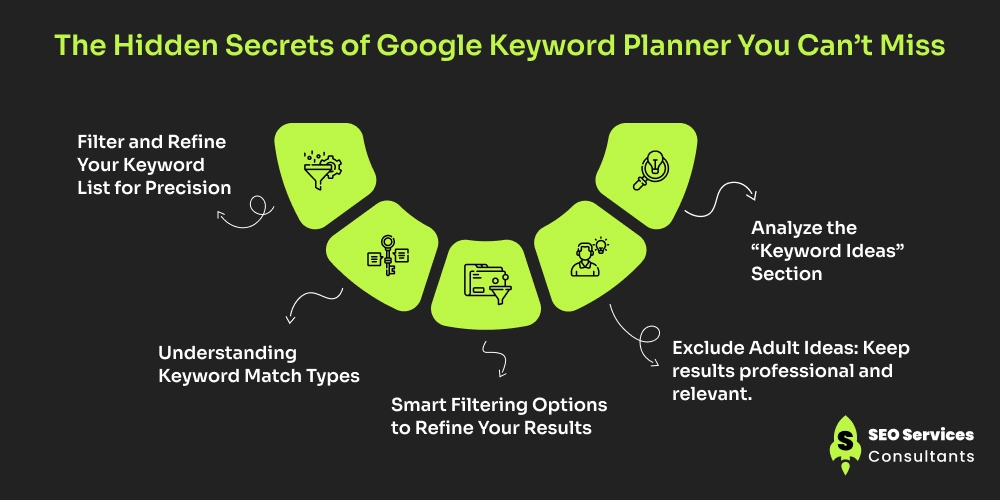
1. Filter and Refine Your Keyword List for Precision
Once you reach the results page, it’s time to focus on quality over quantity. Use Google Keyword Planner’s filters to narrow down terms that truly fit your goals.
At the top of the interface, you’ll find four main targeting controls:
Locations: Choose the regions you want to target. For instance, if your business caters to both the UK and Canada, you can include both markets in your results.
Language: Select the language of your audience. If your customers are primarily German speakers, switch your settings to “Germany” and “German.”
Search Networks: Decide whether you want data only from Google or from its partners like YouTube. For SEO, sticking to Google alone usually gives cleaner insights.
Date Range: A 12-month view offers balanced data that reflects seasonal and long-term search trends.
2. Understanding Keyword Match Types
Google Ads provides three match types – Broad Match, Phrase Match, and Exact Match.
Broad Match captures a wide range of related searches.
Exact Match focuses only on your exact term, ideal for targeting high-intent users.
For instance, if you bid on “digital marketing agency” using Exact Match, your ad will show only when users type that precise phrase.
3. Smart Filtering Options to Refine Your Results
Use filters strategically to uncover the most relevant and profitable terms:
Keyword Text: Include keywords containing a specific word or phrase. Example: if you’ve launched a blue t-shirt line, ensure every keyword includes “blue t-shirt.”
Exclude Keywords in My Account: Skip terms you’re already targeting in your Google Ads campaigns.
4. Exclude Adult Ideas: Keep results professional and relevant.
Avg. Monthly Searches: Filter out extremely high-competition or low-volume terms to balance reach and opportunity.
Competition: This reflects ad competition, not SEO difficulty. For organic search, treat this metric as secondary.
Top of Page Bid: A strong indicator of commercial intent. For example, if “CRM software” has a high top-of-page bid, it’s a sign that businesses see strong ROI potential in that keyword.
5. Analyze the “Keyword Ideas” Section
After refining your list, the “Keyword Ideas” section becomes your best friend for keyword strategy.
Here’s what each column tells you:
Keyword (by relevance): These are the terms Google finds most connected to your entered keyword or website.
Avg. Monthly Searches: Reflects search frequency, though it’s shown as a range. Treat it as directional rather than exact.
Competition: Indicates how many advertisers are bidding on that keyword, useful for gauging market demand and commercial value.
Top of Page Bid (High and Low): Reveals what advertisers are willing to pay for a top spot. Higher bids often signal stronger buyer intent and higher conversion potential.
For instance, if you see “buy SEO software” with a high bid and “SEO definition” with a low one, it’s clear which term attracts revenue-focused users.
Practical Ways to Apply Keywords to Boost Your Business
- Let’s say you own an online bakery.
- You type “cakes” into Google Keyword Planner.
- You discover keywords like:
- “Birthday cake delivery” - 10,000 monthly searches, Medium competition
- “Customized cakes near me” - 5,000 searches, Low competition
- “Online cake order” - 20,000 searches, High competition
- You choose the low-to-medium competition keywords with good search volume.
- You then optimize your website pages and blogs for those keywords.
- As a result, your website starts ranking higher and attracting local customers.
Pro Tip: Reading Beyond the Numbers
Don’t just chase volume. Look for keywords that blend search potential with buyer intent. A keyword with moderate searches but high commercial interest – like “best CRM tool for small business”, can often outperform a broad term like “CRM.”
By mastering Google Keyword Planner’s filters, forecasts, and match types, you transform raw data into actionable insights, helping you rank strategically, attract qualified traffic, and drive measurable growth.
Ready to Rank Your Business? Partner With Our SEO Services Consultants
Our detailed guide explains how to use Google Keyword Planner for SEO to find the right keywords for your SEO strategy. But knowing the keywords is just one part; the real results come from how you use them.
That’s where our SEO services consultants make the difference. We craft data-driven strategies tailored to your website, helping you boost visibility, attract quality traffic, and strengthen your online presence.
In addition to SEO, our PPC management services are designed to deliver measurable growth. From creating high-performing ad campaigns to optimizing keyword bids, we ensure every click works toward maximizing your ROI.
Ready to grow faster? Connect with our SEO experts today and start turning searches into sales.