“Oh God! I’d spent big to build my dream site, and now I can’t see it on Google…where in the space has it disappeared???”
If that’s what you’re wondering, you’re not alone! Nearly 61.94% webpages don’t get indexed initially.
Quick Facts:
- Googlebot discovers 10 billion new pages or 576,000 new websites every 24 hours, but it doesn’t index them immediately.
- It usually takes between 4 days and 6 months for a new site to appear in search results.
Keeping these numbers in mind, if it’s been a few days since your site hasn’t shown up on Google, you can take a sigh of relief. It will, soon!
But if it has been a little while, then do some mind exercise to retrace the basics and go through the checklist :
Quick Troubleshoot Checklist:
- Is your site indexed?
- Is Search Console set up?
- Sitemap submitted?
- Noindex removed?
- Quality links added?
- Backlinks created?
If you check any of the above reasons, it’s good news! Neither your site is broken nor has it disappeared. It just needs some simple fixes.
Keep reading to explore possible reasons your site isn’t showing up in Google search and how to make some quick, easy fixes to resolve it.
The Real Question: Is Your Website Really Not on Google?
First things first! Here’s a quick 2-minute check to confirm what’s really happening, before assuming the worst:
Go to Google and type:
site: yourwebsite.com
(Replace “yourwebsite” with your actual domain name.)
Let’s say, if your website is www.greenbakery.com, then type:
site: greenbakery.com
What The Results Mean:
No Results At All
If you see no results, it means Google hasn’t indexed your site yet. This is quite common for new sites.
Some Pages Appear, But Not Your Homepage
Your site is indexed, but your homepage may have issues.
Only a Few Pages Show Up
Google sees your website, but not all pages are indexed yet.
Important: Just because your website doesn’t rank for keywords doesn’t mean it’s not on Google. Indexing and ranking are different.
How Does Google Find and Show Websites?
Google doesn’t magically know every website that exists. There are three steps involved:
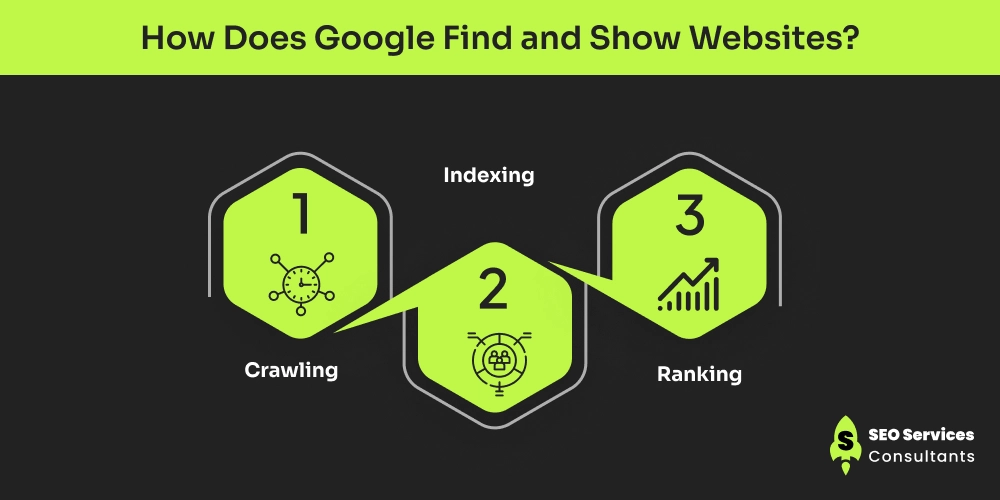
1. Crawling
This is how Google discovers your site. It uses automated bots (called crawlers) that follow links across the web and read sitemaps to find new or updated pages. However, when no links refer to your site, or a sitemap has not been submitted, Google might never discover your site.
2. Indexing
This happens after crawling. Google analyzes the page and decides whether it is worth storing in its database or not. It does not index duplicate pages, pages that have thin content, noindex pages, and pages with technical issues.
3. Ranking
After crawling and indexing the pages, Google compares the pages and determines which pages are presented when a certain search query is made and in what order. Not all indexed pages rank high–they may not rank at all. Also, not all pages rank together and can take time. This depends on the competition and relevance.
Quick Comparison: Crawling Vs Indexing Vs Ranking
Aspect |
Crawling |
Indexing |
Ranking |
|---|---|---|---|
| What it means | Google finds your page exists | Google stores your page | Google shows your page in search results |
| Simple explanation | Google bots visit your site | Google decides if your page is worth keeping | Google decides where your page appears |
| When it happens | First Step | Second Step | Final Step |
| Common problems | Page not discovered, blocked by robots.txt | Thin content, noindex pages, duplicate pages | Low authority, weak content, strong competition |
| Can you control it? | Partially | Yes | Yes (over time) |
| How to fix issues? | Submit sitemap, internal links | Remove noindex, improve content | Better content, backlinks, SEO optimization |
| Typical Timeline | Minutes to days | Days to weeks | Weeks to months |
The Most Common Reasons Why Your Website Isn’t Appearing in Google Search
Let’s diagnose the real issues that might be causing the problem:
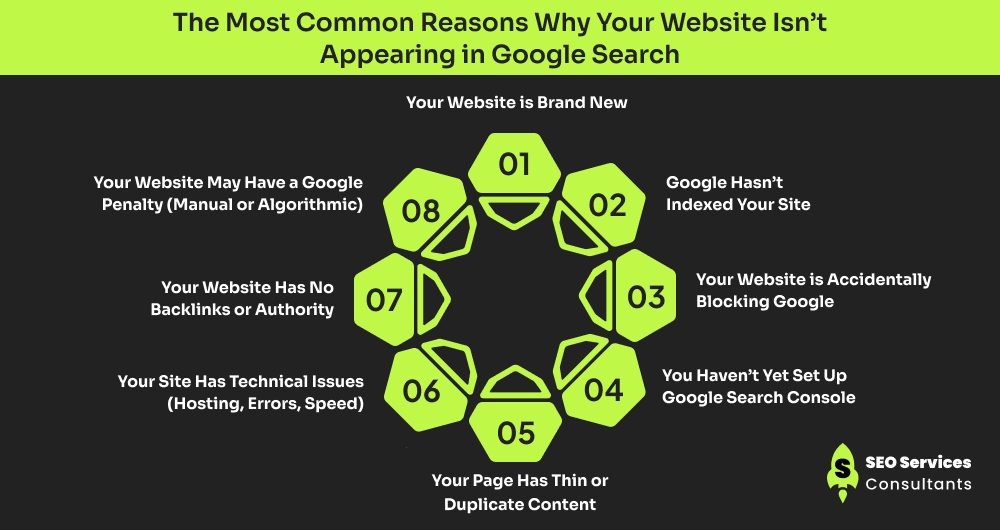
1. Your Website is Brand New
If you’ve just launched your site, slow down! If it has been just a few days or weeks, it’s TOTALLY NORMAL that your site isn’t appearing on Google.
Typical Timeliness:
- First indexing - a few days to 2-4 weeks.
- Stable visibility - 1-3 months
- Competitive rankings - 3-6+ months
Google is risk-averse to brand-new websites, which is understandable. In case of a new site, Google requires time to learn about its pages, the content, and whether the site is reliable and helpful.
There’s absolutely no reason to panic:
- If your site is more than 30 days old,
- Shows no error in Google Search Console
- All important pages are accessible.
- Slow or limited visibility.
At this stage, the best approach for you is to stay calm and patient. Publish quality content regularly and ensure your site is technically ‘healthy’. Visibility of sites usually improves as Google gains confidence in your website over time.
However, consider troubleshooting when:
- The site is over 3-4 weeks old
- Still zero page indexed
- No Search console data
2. Google Hasn’t Indexed Your Site
When we say “not indexed”, this simply means:
Google knows your page exists, but hasn’t added it to search results.
How to check if your site has been indexed?
- Use site: yourwebsite.com.
- Check Google Search Console -> Pages.
Common reasons why Google hasn’t indexed your site:
- Google hasn’t discovered your page (new site, no backlinks, no sitemap)
- Content is very thin (pages don’t provide useful information)
- Pages look duplicate or incomplete (such as placeholder, text, copied content, or “coming soon” pages)
When this happens, Google may delay or skip indexing until you improve the pages and make them valuable for the users.
3. Your Website is Accidentally Blocking Google
Did you know you can control what pages Google can see? If you don’t want certain pages, it won’t!
For this, a “noindex” meta tag is used – a piece of HTML code. It looks like:
<meta name=”robots” content=”noindex”/>
This tag tells Google not to show this page in search results.
This often happens at the time of website setup or development and is usually unintentional.
Since most sites are built in staging or development mode, where indexing is disabled to prevent unfinished pages from appearing in Google. But if you forgot to change this setting, Google will still be blocked.
In other cases, an SEO plugin (like Yoast or Rank Math) may have a “noindex” option enabled by default or left turned on after testing.
Sometimes, a developer temporarily blocks indexing to work on design, content, or technical fixes. If they forget to remove the restriction before the launch, Google will not index it.
How To Check:
- Go to Search Console -> Settings -> Crawling.
- Alternatively, you can use the URL Inspection tool in Google Search Console to determine the indexing status of your site or page.
The URL Inspection tool lets you know whether the page is indexed or if it’s blocked by noindex or robots.txt. It also tells you about any crawl or enhancement issues. You’ll see the “Request Indexing” option if the page isn’t indexed yet.
4. You Haven’t Yet Set Up Google Search Console
Formerly known as the Google Webmasters Tool, Google Console allows website owners to know the index status of their site and its pages.
It tells you:
- the number of times that a site shows up in search
- the queries it appears for
- crawl errors and manual penalties
And, you can also use it to submit a sitemap and request indexing, and monitor page experience signals like mobile usability and Core Web Vitals.
If you want long-term visibility and growth for your site, Google Search Console isn’t optional. It’s your primary communication channel with Google.
5. Your Page Has Thin or Duplicate Content
Google’s job is to show users the most relevant and helpful answer to their queries. If your page and its content don’t really help anyone, Google has little to no reason to show it in search results, even if your site is technically healthy.
Thin Content means a page exists, but doesn’t say much.
Some examples are:
- A “Coming Soon” page with one sentence.
- A homepage with only images and no explanation
- Blog posts that are just a few short paragraphs.
- Service pages that don’t explain what you do, how you do it, or who you do it for.
Such pages seem unfinished or unhelpful to Google.
Duplicate Content means your page says the same thing as many other pages on the internet.
The content could be a replica of pages on the same domain or other URLs.
Common Causes
- Copying text from other websites
- Reusing the same content across multiple pages
- Auto-generated or AI-spun content with no real insight
Important: This doesn’t mean your content has to be lengthy or perfect. It just needs to be useful, original, and clear. A page that genuinely answers user queries has a much better chance of being indexed and ranking than others that exist.
6. Your Site Has Technical Issues (Hosting, Errors, Speed)
Technical problems are usability gaps that prevent Google or users from accessing your pages smoothly. No matter how good your content is, it won’t rank if the site is broken.
Google prioritizes sites that offer usability, especially on mobile.
If Google bots can’t load or navigate through your website properly, they may skip indexing or ranking it altogether.
Common technical blockers:
- Server errors (500, 403, timeouts)
- Site not mobile-friendly
- Pages that load too slowly
- HTTPS or a security issue.
7. Your Website Has No Backlinks or Authority
Backlinks are signs of trust. They are links from other (reputed and credible) sites to your site.
To Google, backlinks act like recommendations or votes of trust.
When reputable sites link back to your website, Google assumes your site is credible and worth showing in search results.
For new websites, all this is normal:
- Having zero backlinks in the beginning
- Not ranking right away
- Slow progress
Having, over time, if no website links back to your site, Google finds it hard to trust your site and consider it useful. Even well-written pages may struggle because Google prefers content that others on the web already recognize or reference.
8. Your Website May Have a Google Penalty (Manual or Algorithmic)
Google can even penalize your site.
Well, if you’re a beginner and have no idea about this, a penalty means Google believes your site has violated its quality guidelines and has reduced or removed its visibility in search results.
Reasons your site is penalized:
- Buying spammy or low-quality backlinks
- Copying content from other websites
- Keyword stuffing or using deceptive SEO tactics
- Hacked or malicious content
A Google penalty is not a label or badge placed on your site that others can see. Instead, Google takes an action behind the scenes.
Here’s what these actions look like:
- Your pages may drop sharply in rankings
- Some pages may stop appearing in Google search
- In extreme cases, Google can remove your entire site from its database (index).
Important: Most websites never get penalized. But if they do, they’re usually caused by aggressive or risky SEO tactics, not honest mistakes.
Penalties can happen in two ways:
- Manual actions: A real Google reviewer checks your site and penalizes it. You’ll see a clear message in Google Search Console explaining the issue.
- Algorithmic action: Google algorithms automatically reduce your visibility when they identify spammy, low-quality, or misleading activities. No message, no warning, only a sudden drop in traffic or rankings.
The good news is that most penalties can be fixed by cleaning up the issue and requesting a review.
What Can You Do Right Now To Fix It?
Here are some quick fixes that can help you index your site and appear in Google search:
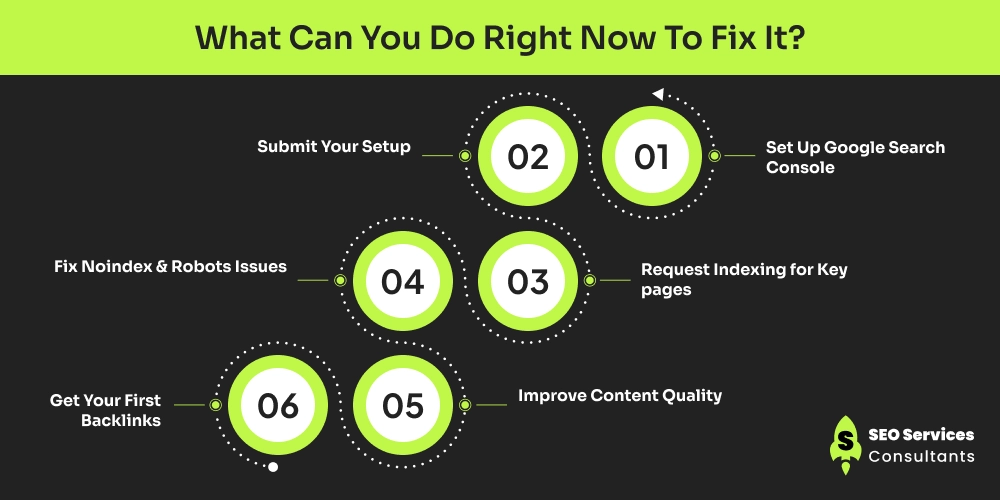
Step 1: Set Up Google Search Console
- Go to Google Search Console
- Add your domain
- Verify ownership (DNS, HTML, or plugin)
This step unlocks everything else.
Step 2: Submit Your Setup
A sitemap tells Google all the important pages in your site.
To find it:
- Open WordPress: /sitemap_index.xml
- Wix/Squarespace: built-in
- Shopify: automatic
Submit it in search console —> Sitemaps.
Step 3: Request Indexing for Key pages
Use the URL Inspection tool.
- Paste the page URL.
- Click Request Indexing
Submit:
- Homepage
- Core Service Pages
- Important Blog Posts
Never submit all pages at once because this will overload the crawl signals of Google. It may also complicate getting the most important pages of your site ranked first by Google, particularly on a low-authority or new site.
Step 4: Fix Noindex & Robots Issues
Check:
- SEO plugin settings
- CMS visibility settings
- robots.txt
Make sure important pages say:
diff
index, follow
Step 5: Improve Content Quality
If your site has weak pages:
- Add clear explanations
- Answer common questions
- Include examples
- Add internal links
Use best practices for content creation, including:
- Clear search intent
- 600-1200 words core pages
- Original, helpful content
Step 6: Get Your First Backlinks
Some easy link-building ideas for your new site:
- Listing your website on relevant directories
- Share content on LinkedIn or Twitter
- Guest post on reputed blogging sites
- Ask partners or clients for links
However, avoid:
- Buying spammy links
- Automated backlink tools
Final Thoughts
Getting visibility in Google isn’t instant, and it’s definitely not personal. All successful websites you see today began with zero traffic and zero rankings. Google takes time to locate your pages, comprehend what they are, and determine whether they are trustworthy.
That trust is gained slowly by consistently publishing, a good structure of the site, and helpful content.
Instead of panicking or making constant changes, focus on fixing the basics and improving your site step by step—Google will catchup as signals improve.
Still not showing up on Google? Get a free website visibility check at SEO Services Consultants and find out exactly what’s blocking you. We can also help you index and rank your website with our comprehensive SEO services.