


Should you delete a page just because it isn’t getting traffic or rankings? Not necessarily.
You may find one SEO expert saying, “Don’t delete it. You could lose rankings,” while another says, “Delete it. It isn’t doing anything for your site.”
So, which one is right?
The answer depends on why the page is underperforming in the first place. Sometimes the page needs better content or a different search intent match. Sometimes it needs to be consolidated with another page. And in some cases, deleting it really is the better option.
In this guide, we’ll show you how to decide whether to keep, improve, consolidate, or delete an underperforming SEO page and what to check before you remove it.
Let’s dig inside!
Table of contents:
- What counts as an “Underperforming” SEO page?
- Before Deleting an SEO Page, Check These 7 Things
- The Real Question: Why Is the Page Underperforming?
- When Should You Update an Underperforming Page?
- What should you improve?
- When Should You Consolidate Two or More Pages?
- When Should You Redirect an Underperforming Page?
- When Should You actually Delete the page?
- What Should You Do After deleting an SEO page?
- How to Audit Your Underperforming Pages in Google Search Console
- Final Says!
What counts as an “Underperforming” SEO page?
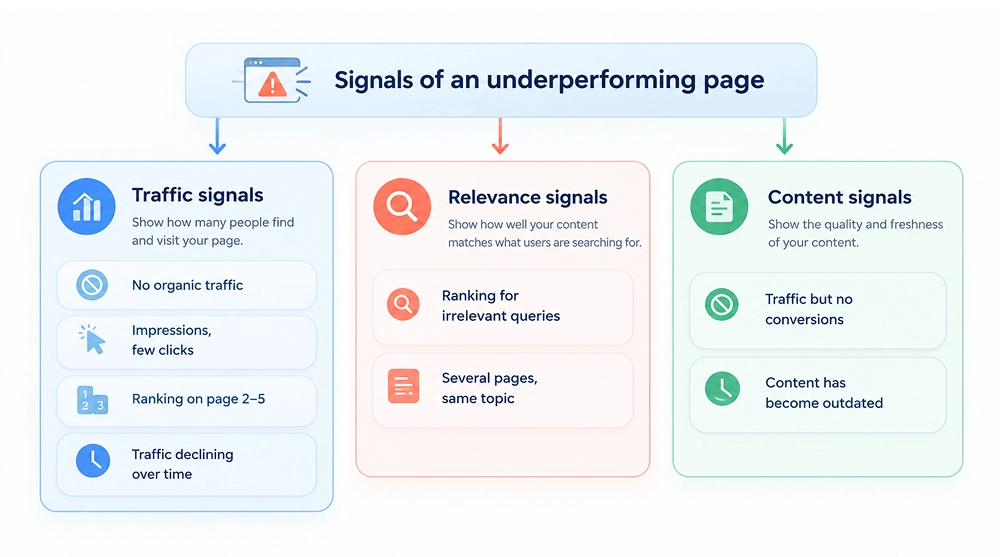
A page can be considered underperforming when it gets little or no organic traffic, has impressions but very few clicks, or consistently ranks on page 2–5 without making progress. These are some of the most common signs that a page isn’t performing as expected.
But low traffic isn’t the only sign. A page can also underperform when it ranks for irrelevant queries, gets traffic but generates no conversions, or has seen a consistent decline in organic traffic.
In some cases, the problem is the content itself. If the page no longer matches the current search intent, is outdated, or doesn’t provide what users are looking for, it can struggle even if it previously performed well.
Another common issue is multiple pages targeting the same topic or search intent. Instead of competing against other websites, your own pages may be competing with each other.
So before you decide to delete a page, you need to understand what is actually causing its poor performance. The following checks can help you make that decision.
Before Deleting an SEO Page, Check These 7 Things
Your website may have several underperforming pages, but that doesn’t mean you should delete them all. Removing a page without checking its value can mean losing existing rankings, backlinks, traffic, or other SEO signals. The right decision depends on why the page is underperforming. Let’s look at what to check before you delete, update, or keep it.
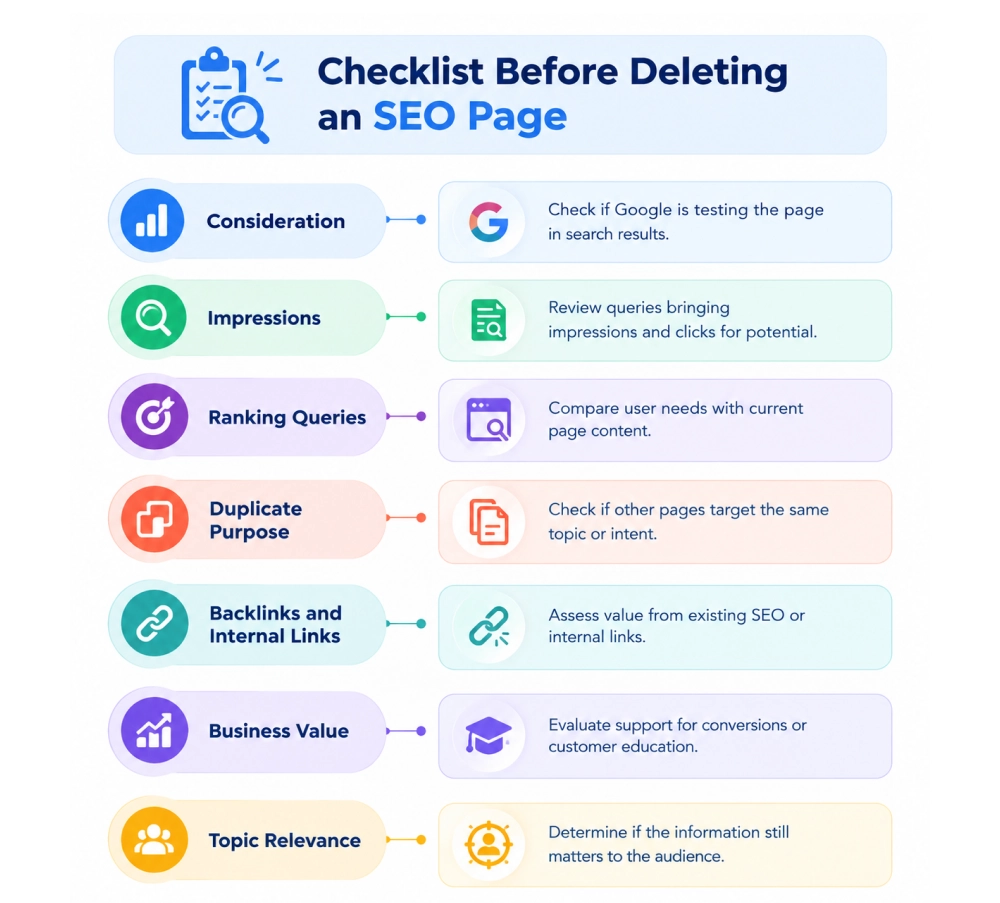
Is the page getting impressions?
Impressions show that Google is already testing your page in search. If you got 5000 impressions with low CTR, this is very different from a page with almost no impressions.
What queries is the page ranking for?
Check the actual queries bringing impressions and clicks. If Google ranks the page for relevant variations, the page may have more potential than its traffic suggests.
Want to increase your website traffic? Read our guide on driving more organic traffic.
Is the page targeting the right search intent?
Compare what the searcher wants with what your page provides. If the intent has changed, improving the content may be a better option than deleting the URL.
Does another page on your site serve the same purpose?
If two or more pages target the same topic or intent, check whether they are competing for visibility. A stronger solution may be to consolidate them rather than remove useful content.
Does the page have backlinks or valuable internal links?
A page with relevant SEO backlinks or an important internal-link role has value beyond its current traffic. Deleting it without checking these links can create unnecessary losses.
Does the page still have business value?
Organic traffic isn’t the only measure of a page’s value. A page may support conversions, educate potential customers, strengthen topical coverage, or lead users to important commercial pages.
Is the topic still relevant?
Check whether the information, product, service, or problem covered by the page still matters to your audience. If the topic is still valuable, updating or restructuring the page may make more sense than deleting it.
The Real Question: Why Is the Page Underperforming?
Before deleting an underperforming page, identify what is actually holding it back. The right action depends on the problem. A page with weak content needs a different solution than a page with no purpose or one competing with another URL.
What’s wrong with the page? |
What should you do? |
|---|---|
| Good topic, but the content is weak | Improve the content, structure, and missing information |
| The page doesn't match search intent | Rework it around what users are actually looking for |
| Multiple pages target the same intent | Consolidate the useful information into the stronger page |
| A better, relevant page already exists | Redirect the weaker URL to the relevant replacement |
| The information is outdated but the topic still matters | Update the page instead of deleting it |
| The page has no useful purpose, demand, or business value | Delete it |
| Traffic dropped temporarily | Investigate first instead of making a permanent decision |
When Should You Update an Underperforming Page?
Not every underperforming page needs a new URL. If a page already has search visibility, relevant backlinks, or some quality content, then the page needs improvement.
To find out whether the page needs improvement, look at the page’s impressions, rankings, backlinks, and search demand before deciding to replace it.
For example, a page ranking around positions 8–20 may have more potential than a new page starting from zero. If the topic still matters to your audience and the existing content has something worth keeping, improve what is already working.
What should you improve?
Don’t update a page simply to make it longer. Focus on the reasons it isn’t satisfying the searcher:
- Search intent: Does the page actually answer what people are looking for?
- Content depth: Are important questions or subtopics missing?
- Accuracy: Remove outdated information and update facts, examples, and recommendations.
- Original value: Add your own examples, data, experience, comparisons, or insights instead of repeating what other pages already say.
- Title and headings: Make them accurately reflect the page and what the searcher wants.
- Internal links: Connect the page to relevant supporting and commercial pages.
- Page structure: Make important information easier to find and understand.
- Conversion path: If the page attracts the right visitors but generates no action, improve the next step, CTA, form, product link, consultation option, or other relevant conversion point.
The goal isn’t to turn a 1,000-word page into a 3,000-word page. Google says its systems aim to reward content that provides substantial, original, helpful, and accurate value—not content created to hit a particular word count.
Tip: If the URL has history and the topic still has value, improve the existing content before throwing it away.
When Should You Consolidate Two or More Pages?
Sometimes the problem isn’t that a page is weak. The problem is that your website has several pages trying to answer the same search. Before deleting one, check whether combining them would create a stronger and more useful resource.
- If two pages answer essentially the same question, they may be better served by one stronger page.
- When both URLs appear for many of the same queries, there may be unnecessary overlap.
- If a large part of both pages covers the same information, keeping both can make the content feel repetitive rather than adding value.
- Compare rankings, impressions, backlinks, traffic, and conversions. Use the stronger URL as the main page.
- Don't simply choose one and throw the other away. Combine the best parts, remove duplication, and build one more complete page.
- If users would get almost the same answer from either URL, one focused page is usually more useful than two competing pages.
Example: A site has separate pages for “real estate SEO” and “SEO for real estate companies,” but both target nearly the same intent. Rather than maintaining two similar URLs, the site could combine the useful content into one stronger page and redirect the weaker URL.
When Should You Redirect an Underperforming Page?
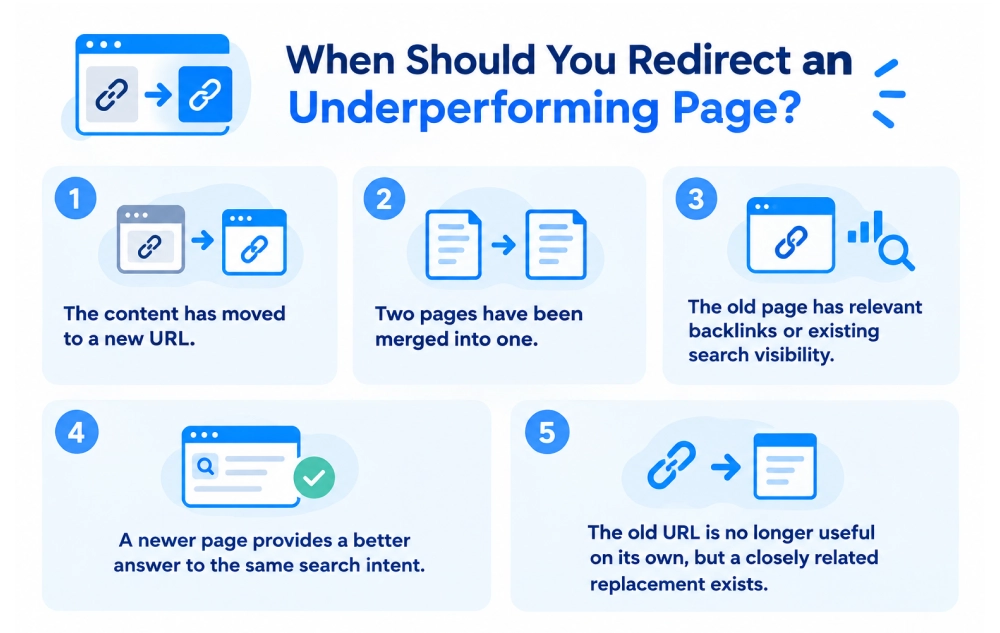
A redirect is the right choice when you no longer need the original URL, but its purpose can be handled by another relevant page.
For example, if you combine two similar pages into one stronger resource, the old URL shouldn’t simply disappear. Redirect it to the new page so users and search engines can find the updated destination.
A redirect can also make sense when:
- The content has moved to a new URL.
- Two pages have been merged into one.
- The old page has relevant backlinks or existing search visibility.
- A newer page provides a better answer to the same search intent.
- The old URL is no longer useful on its own, but a closely related replacement exists.
Don’t redirect a page just because it is underperforming. If there is no genuinely relevant replacement, a 404 or 410 may be the cleaner choice.
When Should You actually Delete the page?
Deletion should be the last step once you have checked the points below. There is a strong case for deleting the page when most of these conditions apply.
See this checklist and decide whether you need to keep the page or delete it.
- The page has little or no organic visibility, and there is no clear sign of future search value.
- The topic is obsolete, no longer relevant, or cannot be updated accurately.
- The page has backlinks from spammy or low-quality websites, with no meaningful backlinks.
- The page has no conversion, traffic, or internal linking value.
- The page doesn’t support another important part of the customer journey.
- The content is thin, repetitive, or doesn’t add value to the customer buying journey.
- There is no relevant replacement URL that needs a redirect.
- The page has been evaluated over a reasonable period, and its rankings are not improving.
If you are still unsure whether to delete or keep the page, don’t delete it just because it has zero traffic. A page with zero traffic isn’t automatically worthless.
What Should You Do After deleting an SEO page?
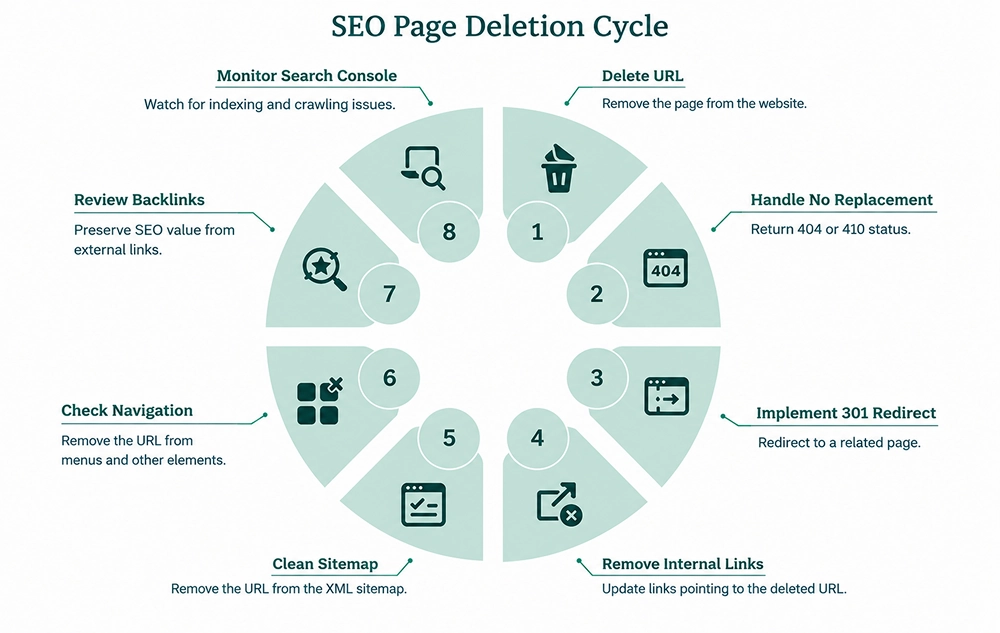
Only deleting the URL doesn’t mean the work is done. You also need to make sure your website no longer treats that URL as an active page. Otherwise, your deleted page can leave broken internal links, outdated sitemap entries, or unnecessary redirects behind.
- No replacement? Let the URL return a 404 or 410 rather than redirecting visitors to an unrelated page.
- Have a closely related replacement? Use a 301 redirect to the page that now serves the same purpose.
- Remove internal links: Find links pointing to the deleted URL and update them to the most relevant live page.
- Clean your sitemap: Make sure the deleted URL is no longer included in your XML sitemap.
- Check navigation and other references: Remove the old URL from menus, breadcrumbs, canonical tags, structured data, and other important site elements.
- Review backlinks: If the deleted page has valuable external links, check whether a relevant replacement can preserve that referral and SEO value.
- Monitor Search Console: Watch for unexpected indexing or crawling issues after the removal rather than assuming the cleanup is complete.
How to Audit Your Underperforming Pages in Google Search Console
- Export pages from Google Search Console.
- Compare clicks and impressions.
- Check average position.
- Review queries for each URL.
- Compare pages targeting similar topics.
- Check conversions in Analytics/CRM.
- Check backlinks.
- Assign each page an action: Keep, Update, Consolidate, Redirect, Delete
Final Says!
Don’t delete a page just because it isn’t getting traffic. First, understand why it is underperforming and whether it still has value for your users, business, or website. If the page is useful but needs work, improve it. If another page targets the same intent, consolidate them. If the content has a clear and relevant replacement, redirect it. And if the page has no meaningful value, no relevant replacement, and no clear purpose, delete it.
Still confused about what to do? An SEO consultant can help you evaluate the page and choose the right action. They can look at its rankings, search intent, backlinks, traffic, and overall value before recommending whether to keep, improve, consolidate, redirect, or delete it, without making unnecessary changes that could affect your site’s performance.

Gurpreet Singh is a Marketing Manager at SEO Services Consultants. Over the years, he has worked with businesses from different industries, building strategies and approaches based on their needs.
The everyday challenges he comes across in his work often become the topics he writes about. His articles share what he learns from his work, research, and observations on ongoing market trends. Through his content, he aims to offer practical, clear, and useful insights to readers.