

Seeing your well-researched blogs not getting indexed after weeks or months can feel like weeks of hard work disappear without a trace. And it can happen to anyone, no matter how experienced or authoritative your brand is.
That’s because there’s no single reason behind pages or blogs not getting indexed. From thin content and overlapping to incorrect canonical tags and crawling issues, several factors can prevent Google from adding your content to its index.
The surprising part!!! Sometimes, there may be no technical problem at all – Google simply hasn’t found enough reason to index your blog.
Google has never said that it will index every page you submit; there’s simply no guarantee. So, instead of repeatedly asking Google to index your page, you should understand what’s actually preventing it from being indexed.
In this guide, we’ll explore:
- The most common causes your blogs are not getting indexed
- How you can identify and address specific issues affecting your blogs
- How you can prevent no-indexing in the future
Let’s get started.
Check Whether Google Has Actually Indexed Your Blog
It’s easy to confuse an indexing problem with a ranking problem, especially when a newly published blog doesn’t appear for its target keyword. So, before you start looking for a reason, first make sure that your blog is actually not indexed.
Here’s a simple way to do it:
Search for the Exact URL in Google
Start with a simple Google search using:
site:yourdomain.com/blog/post-url
If the exact page appears, the page has been indexed by Google. If the page doesn’t show up, it still doesn’t mean the page isn’t indexed. Yet, this is an important first check, and you can confirm its status in Google Search Console.
Use the Inspection Tool in Google Search Console (GSC)
For a more reliable check, enter the blog’s URL into Google Search Console’s URL inspection tool. It will show whether the URL is currently on Google and can reveal why it may not be indexed.
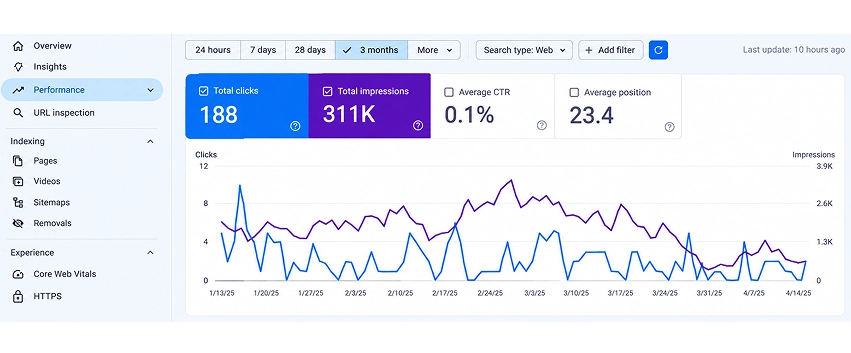
You may see statuses such as:
Statuses |
Meaning |
|---|---|
| URL is on Google | The page is indexed |
| URL is not on Google | Google hasn’t included it in the index |
| Crawled, currently not indexed | The page has been crawled, but Google hasn’t added it to the index |
| Discovered, currently not indexed | Google knows about the URL but hasn’t crawled it yet |
| Blocked by robots.txt | Crawling is blocked for the page |
| Excluded by noindex | An indexing directive is preventing the page from being included in the index |
| Duplicate/canonical issue | Google considers another URL the preferred version. |
Check The Page Indexing Report for Patterns
If several blog posts from your website aren’t indexed, check Search Console’s Page Indexing Report. It can help you understand whether the problem affects specific URLs or reflects a broader site issue.
Takeaway: Don’t start fixing technical SEO until you know what Search Console says about blog url.
Is Your Blog Really Not Indexed or Just Not Ranking?
Before you start finding the fixes for the indexing issue, it’s important to make sure indexing is actually the problem. A blog post not appearing for your target keyword doesn’t necessarily mean Google hasn’t indexed it. It may already be in the index but ranking too low to be visible.
For example, if the URL appears in site: search but doesn’t show up when you search your target keyword, the issue is more likely related to rankings or search visibility.
There can be several similar situations, explained in the table:
Situation |
What It Means |
|---|---|
| URL doesn’t appear in Google | Potential indexing problem |
| URL appears for site: search but not the target keyword | Likely ranking/search visibility problem |
| URL ranks beyond the first few pages | Ranking problem, not indexing |
| URL was indexed and later disappeared | Possible deindexing or changed indexing decision |
| Some blog posts index while others don’t | Usually a page-level/content/architecture issue rather than a complete site indexing problem. |
Takeaway: Knowing which situation you’re dealing with matters because the solution will be different in each case.
Possible Reasons Google May Not Be Indexing Your Blog
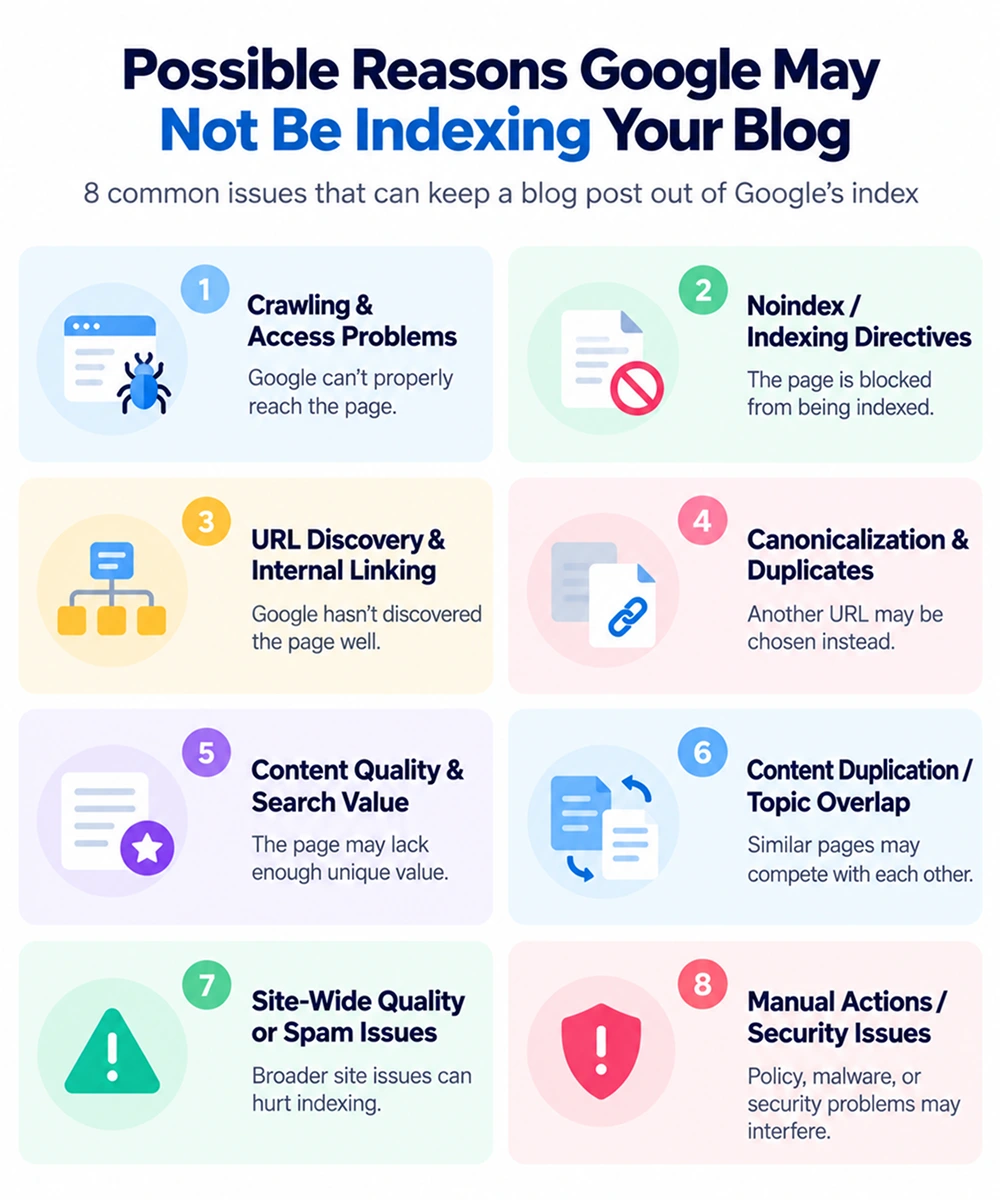
You may be publishing all your blog posts correctly, but they can remain outside Google’s index. What most people believe here is that poor content could be the reason, and they immediately start optimizing it, or may do so several times.
Well, that’s not true!
The reason could be anything from technical access, indexing signals, and other website-level issues that can also prevent a page from appearing in search results.
Knowing the specific cause can help you choose the right fix instead of making unnecessary changes.
1. Crawling and Access Problems
For Google to index your page, it must be able to access and fetch your blog URL first. A robots.txt rule may block crawling, while server errors, 4xx/5xx responses, firewall restrictions, password protection, or DNS and hosting problems can prevent Googlebot from reaching the URL. Even temporary failures may delay discovery or processing.
What to Check:
- URL inspection: Test the live URL in Google Search Console to see whether Google can access it.
- HTTP Status: Confirm the page returns a successful response, usually 200 OK.
- robots.text: Check that the URL is not unintentionally blocked.
- Crawl stats: Review Search Console for recurring server errors or crawl-access problems.
Fix the crawl issues first and request indexing again if appropriate. A request cannot override a crawl block or server failure.
2. A Noindex or Other Indexing Directives Are Preventing Indexing
Sometimes, Google can access your blog post but is told explicitly not to include it in search results. This usually happens because a noindex directive has been added accidentally.
A noindex instruction can appear in the page’s HTML as a meta tag or in an HTTP response header called X-Robots-Tag. It can also be introduced through CMS visibility settings or SEO plugin configurations.
noindex vs. robots.txt – The difference matters
robots.txt controls whether Google can crawl a URL, whereas noindex tells Google not to include a page in search results. So, if crawling is blocked, Google may not be able to see the noindex instruction on the page.
How to diagnose and fix it
- Open the affected URL in Google Search Console and check URL Inspection for indexing details.
- Check the page’s SEO plugin or CMS settings and make sure search engine visibility is enabled.
- Inspect the page source for a noindex meta tag and check the HTTP response headers for X-Robots-Tag: noindex.
- If the directive was added by mistake, remove it, then test the URL again and request indexing.
3. URL Discovery and Internal Linking Problem
This is another issue that occurs when Google hasn’t properly discovered the blog yet. This means you may have published the blog successfully, but Google doesn’t know the URL exists. This is a discovery problem.
This often happens when a post has no internal links pointing to it, which makes it an orphaned page. Besides, when important pages are buried deep within category pages, blog archives, or complicated navigation, this can also cause discovery issues.
If Google has to follow too many links to reach a blog, it may take longer to discover the page. While an XML map can help Google find important URLs, submitting a sitemap does not guarantee that every page will be easily crawled or indexed.
How to diagnose and fix it
- In Google Search Console, check URL inspection to see whether Google has discovered the URL and when it last crawled it.
- Add internal links from relevant, already-discovered pages, such as the main blog page, a category page, or a closely related article. Make sure these links are crawlable.
- Review your blog structure so important blog posts don’t get buried under several layers or left out of category navigation.
- Check your XML sitemap to confirm the blog URL is included and the sitemap has no processing errors.
It is recommended to have clear site navigation and crawlable links to help Google discover your pages easily. Moreover, just having a sitemap doesn’t guarantee indexing.
4. Canonicalization and Duplicate Problems
Sometimes, Google finds your blog post but chooses a different URL to show in search results. This happens when Google considers two or more URLs to contain the same or very similar content and selects one as the main version. This is called canonicalization.
The problem may arise from:
- an incorrect canonical tag
- duplicate URLs created by tracking parameters
- HTTP and HTTPS versions
- www and non-www versions, or
- content republished on another website.
For example: You want Google to index https://example.com/blog/seo-tips/, but its canonical tag points to https://example.com/blog/seo-guide/. In this case, Google may choose the second URL instead.
How to diagnose and fix it
Open GSC and go to the URL Inspection tool to check whether the user-declared canonical and Google’s selected canonical. If they differ, investigate why Google prefers the other URL.
- Correct the canonical tag so it points to the intended page.
- Use consistent URLs in internal links and your XML sitemap.
- Redirect duplicate URLs when appropriate, and use HTTPS consistently.
- If you have republished content, consider whether the original page is clearly identified as the preferred version.
It is important to understand that a canonical tag is a signal, not a guarantee. Google can choose a different URL if other signals suggest it is more suitable.
5. Content Quality and Search Value Problems
Come on, we all know this, yet we make this mistake! Google often does not consider blog posts with poor-quality content, low search value, or technical. That’s because such pages tell the crawler that they don’t add unique value to the search index.
Key reasons include:
- Thin content: Blogs that have less content, no depth, or don’t answer a user’s question properly. Google marks such blogs as “Crawled, currently not indexed.”
- Low-quality AI generation: Content that is generated using AI and zero human editing, fact-checking, or personal insight fails to meet Google’s helpful content guidelines.
- Poor readability and structure: If your blog has broken formatting, excessive grammatical errors, or a lack of proper heading hierarchy, this makes it harder for users and crawlers to consider it valuable.
Other gaps that make your content less valuable are:
- Generic information
- Shallow answers
- Excessive filler
- Little or no original insight
- Impresses search engines, not users.
For example, if someone searches for ways to fix a blog indexing problem, an article that only defines indexing without explaining how to diagnose or fix the issue may leave the reader without an answer.
One of the best approaches to prevent your content from being ignored by Google (and users) is to make every article helpful and specific to the query. It should also be valuable beyond what readers can already find elsewhere.
How to diagnose and fix it:
- Compare your article with the search results: Does it answer the main question completely, or does it repeat information readers can find everywhere?
- Add genuine value: Include practical steps, relevant examples, original insights, or reliable sources where they improve the answer.
- Remove filler: Cut repetitive introductions and sections that don’t help readers solve their problems.
- Review the page’s purpose: Make sure it serves a real audience need rather than existing only to target a keyword. People-first content is what matters to Google.
6. Content Duplication and Topic Overlapping
If your blog has several articles or pages targeting essentially the same need, Google may struggle to determine which page is the best result to show. This often happens when you publish repeated variations of one topic or split a single subject into multiple articles without giving each a distinct purpose.
These pages may compete for the same search queries, and some may remain unindexed. For example, you publish separate articles titled “Why my blog not indexed?” and “Reasons Google isn’t indexing your blog,” but both cover almost identical problems and solutions.
The fix isn’t always deleting content. Review the overlapping pages and choose the best approach:
- Consolidate: Combine useful information into one stronger article.
- Redirect: Redirect redundant URLs to the most relevant page when appropriate.
- Improve: Make one definitive page the most comprehensive resource.
- Differentiate: Keep both pages if they serve clearly different search intents.
However, before you start changing URLs, check their traffic, backlinks, and existing rankings to avoid losing value unnecessarily.
7. Your Site has Broader Quality or Spam Problems
Sometimes, the issue isn’t one blog post. It’s the pattern across the entire website. Imagine you published dozens of articles every week, but none of them provide additional information to what other websites are providing. Moreover, if your site has keyword-stuffed pages, unrelated topics, or backlinks that just manipulate rankings, it may develop broader quality or spam concerns.
Publishing at scale isn’t automatically a problem; the concern is producing pages without enough value for readers.
How can you identify this?
- Review your blog as a whole, not just the URLs that aren’t indexed.
- Look for large groups of repetitive articles, pages created primarily to attract search traffic, and practices that violate Google’s spam policies.
How can you fix this?
- Improve or consolidate weak pages
- Remove manipulative tactics
- Make sure new content serves a genuine need of your audience.
- Check Google Search Console for manual actions, too.
8. Your Website Has a Manual Action, Security and Policy Issue
A blog can disappear from Google Search for reasons that have nothing to do with its individual articles. For example, if someone hacks your website and adds hidden spam pages, Google may detect suspicious activity.
Malware or other security threats can also affect how your site appears. In separate cases, Google may issue a manual action when a human reviewer finds that the site violates its spam policies.
Here’s where you can investigate:
- Manual Actions: Open GSC and select Security & Manual Actions -> Manual Actions. Check whether Google has reported a policy violation.
- Security Issues: Open Security and Manual Actions -> Security Issues to look for hacked content, malware, or other security threats.
If you find a problem, fix its underlying cause, secure your website, and follow Google’s instructions for requesting a review when applicable. Don’t assume every indexing issue is a problem; check the evidence first.
Also Read: Why Is My Website Not Showing Up in Google?
How To Diagnose a Non-Indexed Blog In 10 Minutes?
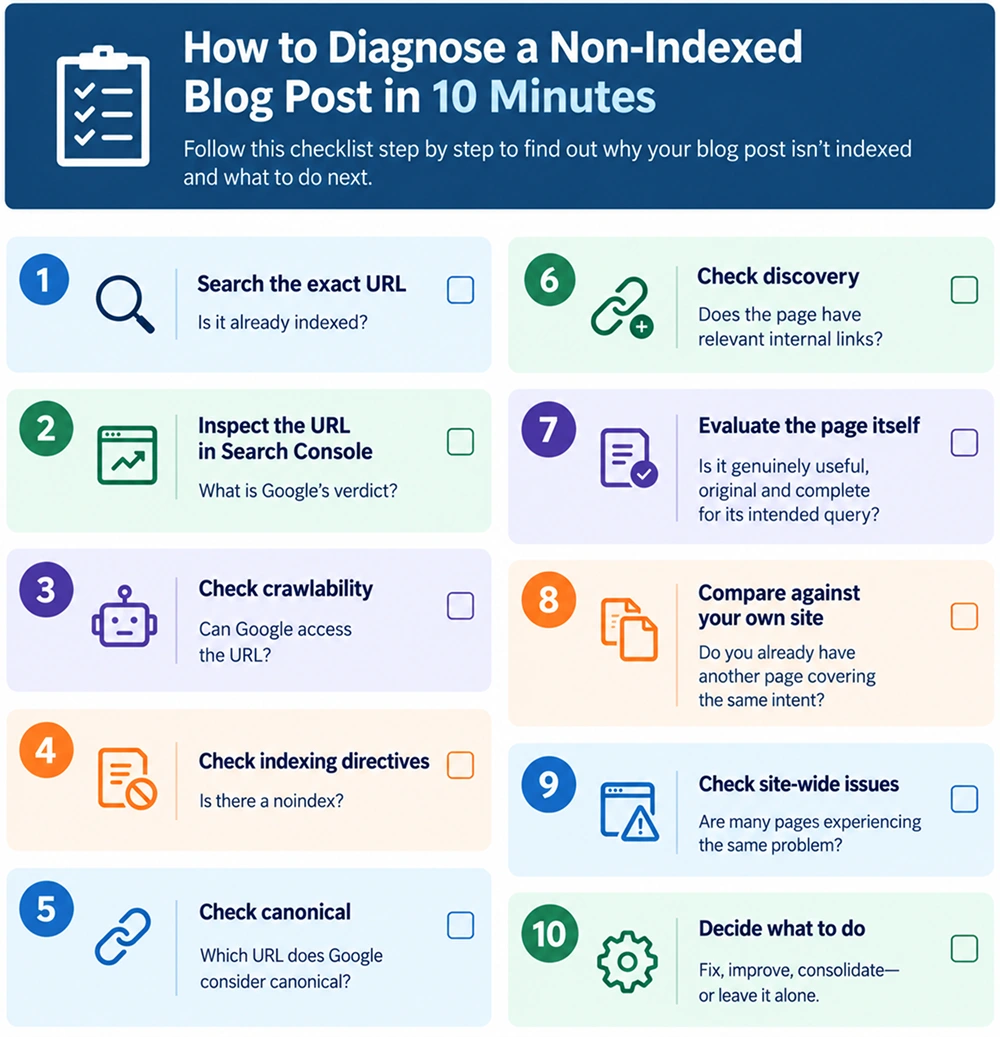
Use this quick checklist to identify what can be the potential reason (s) behind the non-indexing of your blog. Follow each step in order to narrow down the issue, avoid unnecessary fixes, and determine what needs to be corrected.
What Should You Do After Fixing The Issue?
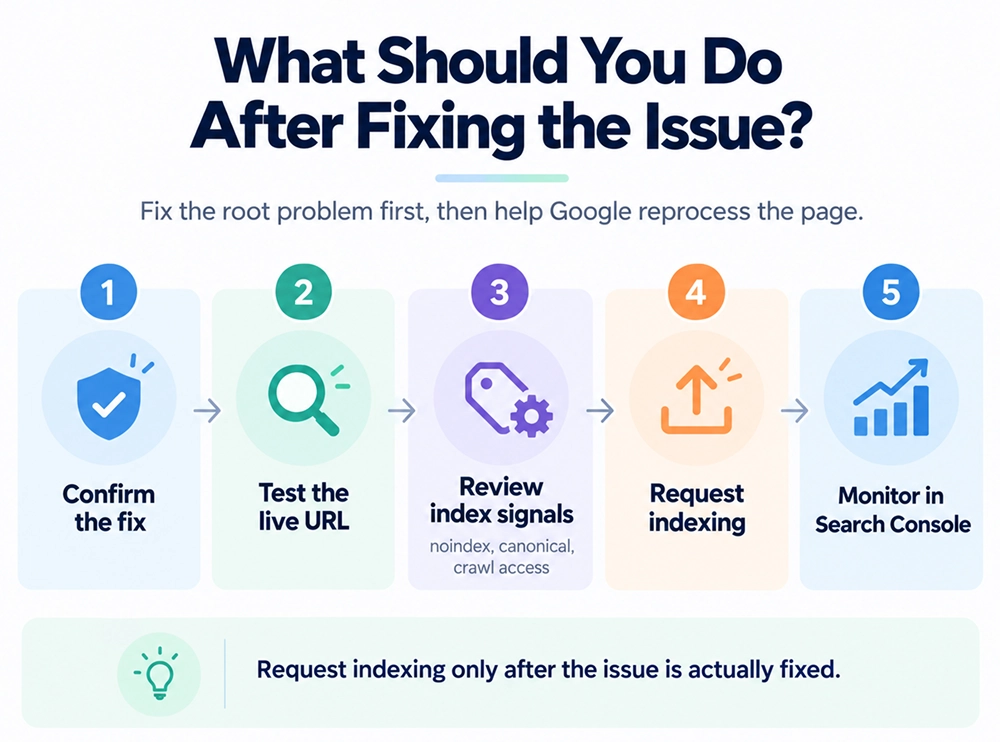
Once you’ve identified and confirmed why Google isn’t indexing your blog, work on fixing the issue before you request reindexing again. For example, remove an accidental noindex tag, improve content that offers little value, or correct the canonical tag.
Here’s what you should do next:
- Validate the fix: Once you resolve the issue, use GSC’s Inspection Tool to check whether the page is accessible and its indexing settings are correct. If you’ve fixed a site-wide issue, use the relevant validation options when available.
- Request indexing when appropriate: If the page is ready to use, use the Inspection Tool to request reindexing. Note that this asks Google to crawl the page again, yet doesn’t guarantee indexing.
- Give Google time to crawl: Once your job is done, be patient. Let Google and its bots do their job, which might take a few days. Avoid repeatedly submitting the same URL without further improvements.
Conclusion
If you’re facing indexing issues for your blog repeatedly, it isn’t necessarily because of a technical issue. Sometimes, the issue lies in your content, the way you interlink your pages, duplicate or canonical pages, or even the way Google evaluates your website.
That’s why the first step is to check your page’s status in Google Search Console and understand what’s actually happening. Once you’ve detected the issue, focus on fixing the specific problem rather than repeatedly requesting reindexing.
Remember, if you want to get your blogs indexed, publish useful, original content that serves your audience. Plus, ensure your website is technically healthy and easy to crawl and navigate.
Yet, if even after trying everything, Google doesn’t index your pages or blogs, get in touch with our SEO agency, SEO Services Consultants, and we’ll get it done.
Frequently Asked Questions
1. How long does Google take to index a blog?
It can take a few days to several weeks for Google to index a blog, particularly if your website is quite new. This depends on several factors, such as content quality, interlinking, technical structure, and health, authority of your site, etc.
2. Why is my blog showing “Crawled - currently not indexed”?
If you see this status in Google Search Console, it indicates that Google has explored your blog, but it hasn’t included it in the index yet. To identify possible issues, review content quality, content originality, duplicacy, and canonical settings.
3. Why does Google discover my page but not index it?
This status means Google knows your page exists, but it hasn’t crawled it yet. Check site structure, internal links, crawl accessibility, or whether Google has revisited the URL.
4. Can publishing too many posts hurt my rankings?
No, publishing content frequently does no harm to your organic rankings. However, if you produce large volumes of low-quality, repetitive content, this can weaken overall site quality and waste resources without improving search visibility.
5. Why are some blogs indexed but others aren’t?
Google evaluates page individuality. Differences in content quality, canonical tags, internal linking, accessibility, and duplication can explain why some blogs get indexed while others don’t.
6. How can I check whether a blog post is indexed?
Search Google using site:yourdomain for a quick check. To confirm the status, enter the exact URL into Google Search Console’s URL Inspection Tool to view its actual indexing status.

Gurpreet Singh is a Marketing Manager at SEO Services Consultants. Over the years, he has worked with businesses from different industries, building strategies and approaches based on their needs.
The everyday challenges he comes across in his work often become the topics he writes about. His articles share what he learns from his work, research, and observations on ongoing market trends. Through his content, he aims to offer practical, clear, and useful insights to readers.